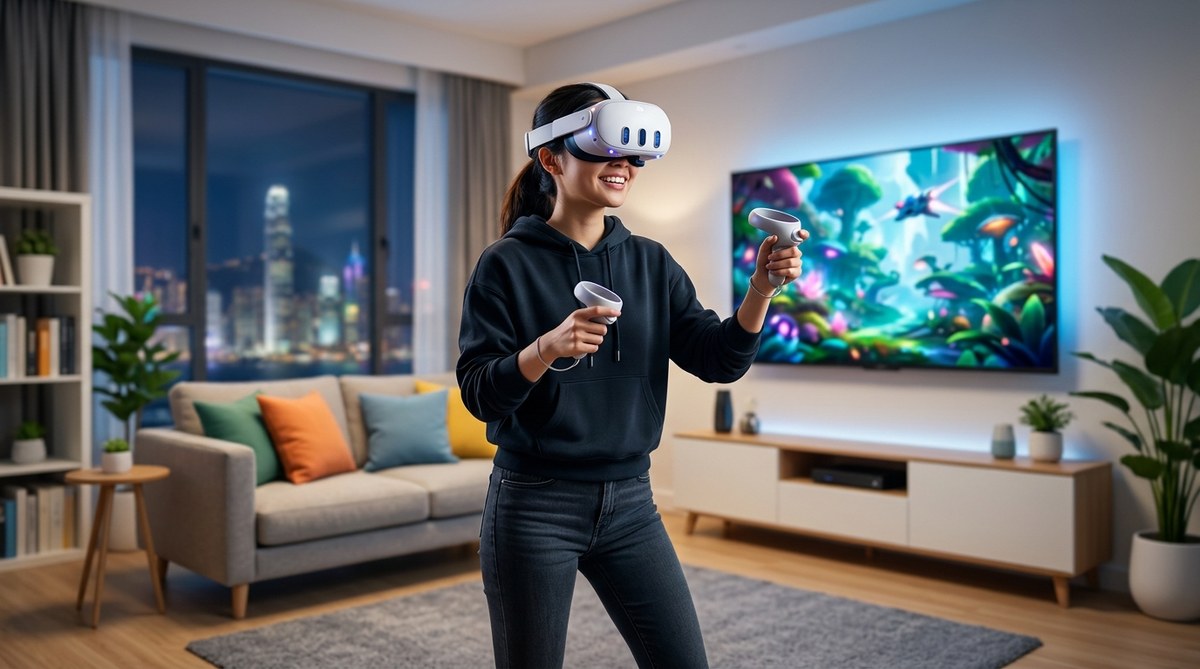
The world of VR gaming is expanding faster than ever and the barrier to entry is lower than you might think. Whether you want to escape into immersive adventures, get a quick cardio session in with VR fitness, or challenge friends in multiplayer titles, there is a VR setup that fits your budget and space. At FreeGames.hk we help you navigate the evolution of VR gaming, pick the right headset, and start exploring a library of action packed, puzzle driven, and family friendly experiences. This beginner guide covers everything you need to know to get started with VR gaming, plus practical tips you can apply today.
What VR gaming is and why it matters
Virtual reality gaming is a form of gaming that uses a headset to create a sense of immersion inside a digital world. Unlike traditional gaming on a monitor, VR places you inside the action, often with motion controllers or tracked hand presence. You look around a virtual environment and interact with it as if you were really there.
- Immersion matters: VR tricks your brain into feeling present. When done well, you notice less of the screen and more of the world inside the headset.
- Interaction is natural: Many VR games use motion controllers or tracked hands so you can grab, throw, swing, and move with less reliance on buttons.
- Exercise can be part of the experience: VR fitness games and active titles let you move your body while playing, which adds a healthy dose of fun to workouts.
What VR can do for you includes deep storytelling experiences, social VR moments with friends, and intense action that makes you feel like you are inside the game. That is why many players keep coming back to VR even after playing traditional games for years.
VR equipment options: choosing a path that fits your space and budget
There are several paths you can take when starting your VR journey. Each path has its own advantages and compromises.
Standalone headsets: simple setup, no PC required
Standalone VR headsets contain the display, sensors, and processing power inside a single device. You can hop into VR without a PC or console, though you may still connect to a PC for extra performance on some models.
- Pros: Easy setup, portable, no cables to your PC, quick access to a large library of games.
- Cons: Typically less graphical power than a high end PC VR setup, storage capacity matters, some models have limited battery life.
Popular standalone options include Meta Quest models. They support a wide catalog of games, and you can cast or stream to a TV or computer screen for friends to watch.
PC VR headsets: top notch visuals and performance
PC VR headsets connect to a powerful computer. They typically offer better graphics, higher frame rates, and more precise tracking. You can also access PC exclusive titles and mods.
- Pros: Superior visuals and performance, broader catalog of PC VR games, easier to upgrade as hardware improves.
- Cons: Requires a capable PC, more cables, a larger upfront investment.
Common PC VR systems include models from Valve, HP, and other manufacturers. If you already own a gaming PC, PC VR is a natural next step to maximize visual fidelity and response.
Console VR: the modern middle ground
Some players prefer console based VR experiences, especially when you already own a PlayStation console. Console VR can deliver solid performance with a streamlined setup.
- Pros: Convenience, solid performance, strong exclusive titles on some platforms.
- Cons: Less flexibility than PC VR, you are tied to a particular console generation.
VR headsets for kids and family friendly setups
If you are shopping for younger players or a family friendly setup, look for headsets that emphasize safety features, comfortable fits, and age appropriate content. Always check the recommended age guidelines for each headset and game.
Wired vs wireless: does it matter?
- Wireless headsets offer mobility and fewer cables, great for larger play spaces and casual sessions.
- Wired connections reduce latency and can provide more consistent performance, which benefits competitive or precision based games.
Consider your room size, how many people will use the headset, and how important latency is to you when deciding between wired and wireless options.
Planning your play space: room scale and comfort
A good VR experience starts with proper room planning. Here is what to consider before you open a headset.
- Space requirements: For room scale VR you typically want a clear area of at least 6 feet by 6 feet. If you have a smaller space, seated or standing VR experiences can still be a lot of fun.
- Boundaries: Use a boundary setup system to keep you from bumping into furniture or walls. Some headsets offer virtual walls or guardian features to help you stay safe.
- Lighting: Even lighting helps the tracking system keep your hands and controllers in sync with the virtual world.
- Mat or play area markers: A soft mat or taped boundary lines can guide you to stay within your safe zone.
- Safety checks: Remove fragile objects, watch for pets, and ensure you have a clear ceiling space if you plan high energy movement.
Comfort matters just as much as space. Adjustable headbands, IPD (interpupillary distance) settings, and strap comfort can all affect how long you enjoy VR sessions without fatigue or pressure points.
Key VR terms you should know
Getting comfortable with the language helps you choose the right gear and understand guides and reviews.
Degrees of Freedom (DoF)
- 3DoF: Three degrees of freedom track only head orientation (where you are looking). This is common in older or simpler experiences.
- 6DoF: Six degrees of freedom track head movement and position (where you are in space). This is what most modern VR games use for full locomotion.
Field of View (FOV)
- The extent of the observable world seen through the headset. A wider FOV can enhance immersion, but the actual number is less important than how comfortable the headset feels on your eyes.
Motion sickness and comfort basics
- Motion sickness in VR happens when your eyes perceive movement while your body is still. You can reduce it by using comfort settings, gradual acclimation, and choosing experiences that match your comfort level.
- Tips: start with seated or stationary experiences, take breaks, and adjust movement options to teleportation or dash style locomotion if you are prone to nausea.
Other common terms
- IPD (interpupillary distance): the distance between your pupils. Proper IPD adjustment improves image clarity and can lessen eye strain.
- Guardian boundaries: the virtual safety mesh that prevents you from walking into real world obstacles.
- Pass-through: a feature that lets you see your real environment through the headset using cameras for safer movement.
Types of VR experiences you can dive into
VR is not just about games. It spans several categories, each offering a unique way to play, learn, and connect.
VR gaming genres and games to try
- Action and shooter games: fast paced movement and precise aiming tests your reflexes.
- Puzzle and strategy: mind challenging titles that use spatial reasoning and problem solving.
- Adventure and exploration: immersive worlds with narratives and discovery moments.
- Rhythm and music: beat based challenges that require timing and movement.
- Sports and fitness: workouts integrated into gameplay for a cardio focused session.
VR fitness and wellness
VR fitness titles turn exercise into a game. They can be a fun way to stay active, burn calories, and improve endurance while exploring virtual worlds.
VR social and shared spaces
Social VR platforms let you meet friends, attend events, and collaborate on shared tasks inside virtual environments, regardless of your physical location.
VR video and immersive media
VR films and 360 degree videos provide cinematic experiences that place you inside the action. It is a different flavor of entertainment compared to traditional video.
Home VR versus VR arcades
- Home VR gives you access to a broad range of titles and ongoing personal use at a lower cost per hour when used regularly.
- VR arcades offer high end setups, guided experiences, and access to equipment that might be expensive to own at home.
Getting started: a practical setup guide
Follow these steps to begin your VR adventure quickly and safely.
Step 1: Decide on your path
- If you want simplicity and portability: consider a standalone headset.
- If you crave the best visuals and PC power: plan for a PC VR setup.
- If you want a balance and you already own a console: explore a console VR option.
Step 2: Set up your play space
- Clear the area, mark boundaries, and choose a safe surface for standing or moving.
- Calibrate the headset fit and IPD for clear visuals and comfort.
- Connect any required sensors or basestations and update firmware.
Step 3: Learn the basics of locomotion and comfort
- Start with teleport or dash style movement to minimize motion sickness.
- Take regular breaks and gradually increase session length as you adapt.
Step 4: Accessing content
- Browse the headset store for beginner friendly experiences.
- Try demos and free titles to learn the basics before purchasing full games.
Step 5: First games to try
- Look for titles that are described as beginner friendly, with simple controls and forgiving pacing.
- Favor experiences with gentle learning curves and clear tutorials.
Step 6: Care and safety
- Keep headset clean with proper microfiber cloths.
- Protect the lenses from scratches and avoid applying liquids directly to the lenses.
- Take care of your eyes by ensuring proper lighting and minimizing glare.
VR hardware recommendations tailored to budgets
Here is a simple guide to help you pick a setup that matches your wallet and goals.
Budget friendly (entry level)
- Standalone headset models with plentiful libraries
- Look for bundles that include extra controllers or a carrying case
- Expect decent performance for casual and family friendly games
Mid range
- PC VR capable rig with a comfortable headset
- A balance of performance and price, allowing higher fidelity visuals
- Access to a larger library and frequent software updates
Premium setups
- High end PC VR with top tier displays and tracking
- Larger space and more accessories for an optimized experience
- Best suited for enthusiasts and twitch based players
VR gaming evolution: where we started and where we are going
VR has evolved from experimental devices to mainstream gaming gear that many people can use in their living rooms. Early headsets offered limited tracking and chunky designs. Over time, tracking became more accurate, displays improved, and tracking controllers became more natural to use. Today, consumers have a wide range of options from compact standalone devices to feature rich PC VR systems.
Looking forward, the VR landscape is likely to include better optics, faster processing, more comfortable headsets, and broader content that includes more social experiences and cross platform play. Streaming VR content to other devices is also becoming more common, allowing friends to watch or join experiences remotely.
Streaming and sharing VR experiences
Streaming VR can mean two things:
- Streaming gameplay to platforms like Twitch or YouTube so others can watch while you play.
-
Casting the headset display to a TV or monitor so others can see what you see inside the headset.
-
Tips for streaming: ensure stable network connectivity, use a capture device if you stream PC VR, and balance in game settings to maintain smooth frame rates.
- Family and friends often enjoy watching someone else play VR, so streaming is a great way to share the experience even if they do not own a headset.
What to play first in VR
If you are new to VR, a careful selection of starter titles will help you acclimate to the new sensations and controls without overwhelming you.
- Start with guided tutorials: Many VR games include a gentle tutorial to teach the basics.
- Pick experiences with friendly pacing: Titles that emphasize exploration and discovery tend to be easier for beginners.
- Try public demos and early access: Some developers offer a lite version that lets you sample the core mechanics before buying.
Common beginner questions answered
- Do I need a powerful PC for VR gaming? Not necessarily. Standalone VR can provide entertaining experiences without a high end PC, while PC VR unlocks more demanding titles.
- Will I get motion sickness in VR? Some people do, especially with fast paced or jumpy movement. Starting with seated experiences or teleport locomotion can reduce this risk.
- Is VR safe for kids? Most VR headsets have age recommendations. Always check the guidance from the manufacturer and supervise younger players to ensure age appropriate content and safe play space.
- How long should I play VR at a time? Start with shorter sessions, like 15 to 20 minutes, and gradually increase as your comfort grows.
Why FreeGames.hk is your VR guide
- We cover a wide range of VR topics including hardware selection, setup guides, and tutorials to help you compare options.
- Our blog posts explore streaming basics and how to share VR experiences with friends.
- We review and discuss popular titles and what makes them great in VR, while also tracking how VR is evolving.
- We offer practical guidance on choosing headsets, space planning, and comfort features to help you get the most from VR gaming.
Getting the most from your VR journey: tips and best practices
- Start small, then scale up: begin with simple games to build comfort and confidence.
- Schedule regular breaks: your eyes and brain will thank you.
- Invest in a comfortable setup: a good head strap, face pad, and IPD adjustment can dramatically improve comfort.
- Keep your play space clear: remove obstacles and keep cables organized if you are using a wired setup.
- Explore social and community content: joining VR communities can help you discover new titles and learn from other players.
Practical checklists for new VR gamers
- [ ] Decide your budget and preferred platform (standalone, PC VR, or console VR)
- [ ] Check room space and safety boundaries
- [ ] Choose a headset that fits your comfort and library needs
- [ ] Calibrate IPD and fit before playing longer sessions
- [ ] Start with beginner friendly or free demos
- [ ] Learn basic locomotion options and adjust settings for comfort
- [ ] Create a simple play schedule to maintain safety and avoid fatigue
- [ ] Watch streaming content to learn from others and share your own sessions
A closing note: your VR journey starts here
VR is a vibrant and growing space that welcomes players of all ages and interests. It can be as casual as a weekly workout or as intense as a fast paced shooter with friends across the globe. The most important thing is to start with the path that matches your space, budget, and comfort level. As you gain experience, you can upgrade your headset, add tracking accessories, or explore PC VR for the ultimate in resolution and performance.
At FreeGames.hk we are here to help you along the way. Use our guides to compare APK vs App Store versions for mobile VR experiences, learn the basics of streaming your VR gameplay, and dive into thoughtful reviews of titles that push the boundaries of what VR can be. Whether you want to chase Elden Ring in a new perspective, conquer Valorant from a VR throne, or simply relax in a virtual living room with friends, the journey begins with a single, curious step into virtual reality.
If you are new to VR, take a breath, pick a comfortable headset, and let curiosity lead you. Your next session might just become your favorite gaming memory. Welcome to the world of VR gaming at FreeGames.hk.
Related Posts
Choosing the Right Gaming Headset
Finding the right gaming headset can be the difference between a frustrating match and a thrilling win. Whether you're chatting with teammates during an intense battle or soaking in the sound design of a solo RPG, your headset plays a…

How to Adjust Sensitivity Settings for Better Control
Properly adjusting sensitivity settings is a crucial step for gamers who want to succeed and improve their control in games. It’s not just about being fast with character movements or precise with shooting, but also about enhancing your overall gaming…
How to Craft and Upgrade Gems Efficiently in Diablo 3
The Importance of Gems in Diablo 3 Gems play a vital role in Diablo 3, serving as powerful enhancements that can significantly improve a character’s performance. Whether it's boosting damage, increasing survivability, or enhancing secondary stats, gems are an essential…